 |
Gavilan College |
Lesson
26:
Footers
|
I'm going to sneak in one little lesson here before we head into javaScript. This lesson is going to step you through adding a footer at the bottom of each of your pages. It's a very simple process. |
Footers |
Footers are exactly what they sound like: information at the bottom of your pages. It helps your readers to have at least these items consistently in place at the end of each page:
At the end of each of these lessons, I have a footer. You've probably appreciated them immensely. Or possibly never noticed them. However, adding footers adds continuity and repetition to your website, lets your readers know what to anticipate, and makes for easier navigation around your site. |
Adding these footers will mean adding html coding to each of your pages, which is easy to do using the<address> tags. Hint: add the coding to your first page, then copy and paste to all your other pages. The only thing you'll have to change with each one is the URL of individual pages (tours.html, survey.html, etc.) |
<address> |
||
The address tag tells the browser that the text enclosed between the opening and closing tags should be treated separately from the main body of the page. Most browsers print it one size smaller, and some browsers print it in italics. Add this block of coding to the bottom of the page, just before the closing </div>, </body> and </html> tags:
|
Note: If you put the address block BELOW the closing /div tag, it will probably show up at the top left corner of your page, not where you want it at the bottom. Make sure you put it ABOVE that closing /div tag. Here's what it looks like on the bottom of Penelope's survey. You can click on that image and see her address box at the bottom of the survey. |
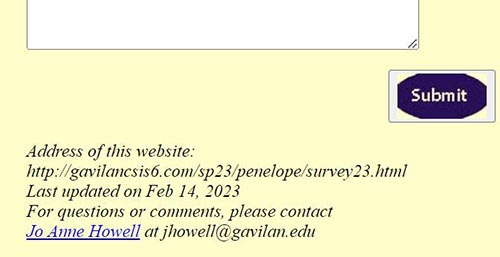 |
For your final website project, you should add a footer to each of your pages. Change the URL to match each page, and possibly the date for each page as you modify and upload. You can click on the image above to see Penelope's page. This is going to add a touch of professionalism to your pages. |
|
Assignment |
Add an address section at the bottom of one of your pages, possibly your Home page. Penelope has added one to her survey page, and you can look at the coding there to get an example. Find Assignment 26 in the classroom, and paste the URL in the submission box. Then turn off your computer and see if you can hold a plank pose for 15 seconds. |
Address of this page:http://hhh.gavilan.edu/jhowell/fall21/26.2.html
Last updated
February 14, 2023
For questions please contact Jo Anne Howell at
jhowell@gavilan.edu