 |
AH3 Life Cycles Parts of a URL |
| |
AH3 Life Cycles Parts of a URL |
Major Contributors of Information on the Internet |
|
| You'll be getting a lot of your information through the Internet, so it's a good idea to understand who is putting the information out there. This will help you decide whether the information is believable or reliable. Major contributors of Internet information can be organized into 4
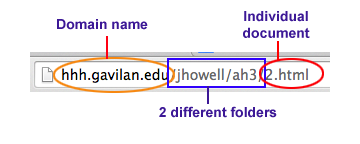
large categories: 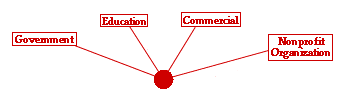
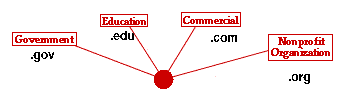
Each of these contributors uses a different ending in their domain name, the part of the Internet address between the double slashes and the first single slash.
|
| If the address in the address bar at the top of the screen has an address like this: |  |
then we can safely assume a couple of things:
This will be true even if the address has many more folders and files
after this domain name. Remember that we are looking only at the first
part, the part between the double slashes and the first single slash. 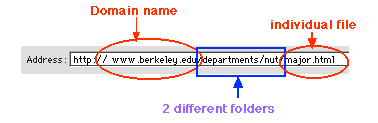
| |
| Think of the web address (URL) as directions to the
computer on how to find a particular website. In this URL, we are telling
our computer to:
The specific document is always the last piece of a URL, and will usually end in .html, htm, or .php. | |
Examples of the four main Internet contributors |
| Information about the grand theories of human development could come from any one of these Internet contributors, and any one of them could be reliable, believable, current and trustworthy. Knowing where they are coming from is a starting point in evaluating whether the site meets these standards. Here are examples of the four different website creators:
First look at this website:
http://www.simplypsychology.org/operant-conditioning.html
You can tell from the domain name that it comes from what type of organization? There are no folders in this URL -- the html document is on the first level of the www.simplypsychology.org system. The specific document that will be displayed with this URL is operant-conditioning.html Erase that part of the URL, to get back to the home page of this site. Click at the end of the URL, up in the address bar. The entire URL should become highlighted. Click again and your cursor will be left blinking at the end of the URL. Erase the folder. When you have nothing but the domain name in that address line, click the GO button. Scroll down to the bottom of the home page, and click on the About Us button. This website was started and is now maintained by Saul McLeod, a researcher at a university in England. Can you find the name of the university? He doesn't say if he is the only writer, or how he finances the site (who pays the bills). But because the domain name ends in .org, we might assume that it's not being funded by Pfizer Pharmaceuticals. |
| Here's another website to look at: Look again at the domain name. www.personal.psu.edu
The complete URL is directing your browser to find this system (www.personal.psu.edu), then look for a folder called wxh139, and inside that folder, look for a document called bahavior.html. This educational institute is not as obvious as our Berkeley example above, but we can still find out what school is putting up the site. Simply erase everything that comes after the domain name in your address bar (remember that bar at the top of the screen), so you are left with this: https://www.personal.psu.edu
This is the personal part of the school's website, a place where students, faculty and staff can all put up information. What is the name of the school? We can also find out whose personal page this is, by putting the folder name back onto that address: http://www.personal.psu.edu/wxh139/ This is a personal website for an instructional designer at a university, and is one example of the type of information that educational sites are sharing. Others might be instructor pages, resumes, research findings, instructors' or students' personal opinions. |
 |
Next try this website: http://www.crystalinks.com/piaget.html From the domain name ending, what can you tell about the supporting institution? This is another site that has no folders. On the main system (www.crystalinks.com), the browser should find the document entitled piaget.html. Go directly to the domain name by erasing the /piaget.html in the address bar (http://www.crystalinks.com/) and see what you can find out about the creator of this website. One of the black buttons across the top is labelled ABOUT, which will give you more information about the author. Who is this woman and what is she trying to sell? Remember, most .com websites are trying to sell you something. |
| And last, look at this website:
What type of institution is putting this page up? This site has three folders that our browser has to look through: first find the system called cancercontrol.cancer.gov, and on that system, find the brp folder, and inside that folder, look for the research folder, and inside that folder, find the constructs folder. Finally, look for a document called self_efficacy.html. This is an example of the type of information that governments (city, county, state, national) post on the Internet. This particular one, from the National Cancer Institute, a government agency, talks about the various health behavior theories. In addition to individual government agency sites, there are three huge national libraries that we have access to, and that provide a wealth of information:
We will be using the NLS database (through Medline, for research results, and MedlinePlus, for the general population) in another module, so you'll have a chance to see the kinds of information they have stored for you. | |
Exceptions to the Rule |
| And there you have examples of the four big supporting institutions of
Internet websites. Unfortunately, there are many, many more domain name
endings, more keep coming out as the Internet grows, and lines of
distinction between the different institutions are becoming blurred.
Look at this website: Since this domain name ending (.ca) is none of the endings that we are familiar with, we can't immediately identify the source of the website. You might even think it's coming from California, because of that .ca ending. However, you now know a way to get back to the homepage of the institution, by erasing the ending folders and files of the URL in your address bar, until you are down to just the domain name:
What institution is supporting this site and where are they located?
In case you haven't figured out where Saskatchewan is, that .ca stands for Canada, not California. This is the type of detective work you have to perform in order to find
out the most basic information about Internet sites -- who is supporting
them. |

 |
Review |
In this module, we have discussed the four big contributors
to the Internet:
We have also illustrated the various parts of a URL (address of a website), and how they direct your computer to find a particular website.
You should be able to spot these different parts of an internet address (URL):
You can identify the supporting institution of a website, even if the domain name is not something you recognize. Starting from the end of the address, erase everything back to the domain name, without all the folder or document names, and see just who is paying the bill to post the website. | |
And finally, you should recognize one special domain name ending: http://etad.usask.ca/802papers/mergel/brenda.htm That .ca ending means the document is from Canada, not California. |
|
Now go back to the classroom and take the
Infocomp Quiz #2.
Like the first quiz, you'll get two chances to get 100%.
Only your highest score will be saved.
| Address of this
page: http://hhh.gavilan.edu/jhowell/ah3/2.html Last updated on August 29, 2018 |